
Several of the email messages controlled by the AMS have been updated to utilize the Notification settings that are found in the Edit Contact section. By clicking the edit "pencil" icon on any contact found on the account details tab you can now select specific email they should receive.
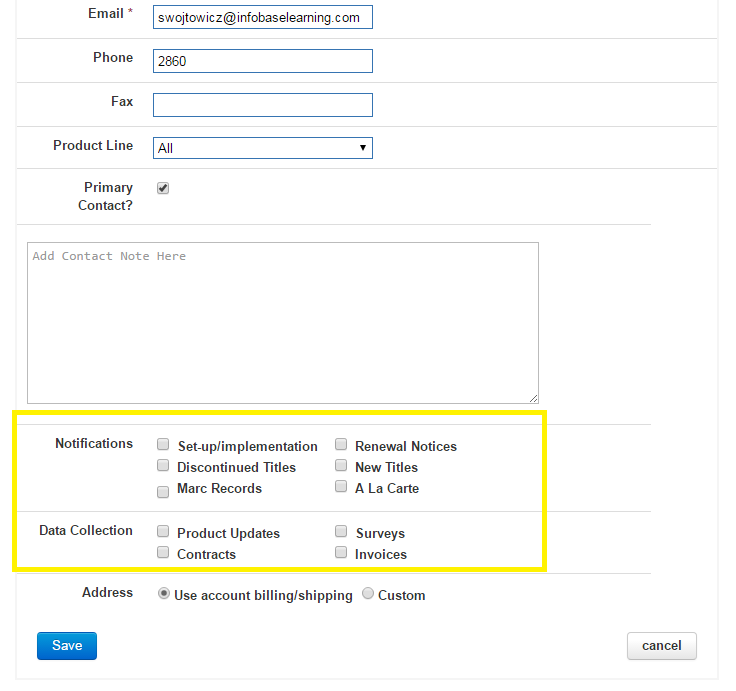
These Contact Rules have been separated into two categories:
Notifications
The options available here directly control their corresponding messaging component.
Setup/implementation - contacts selected here will be included by default into any New Trial, New Subscription, or Renewal access information emails that are sent from the AMS. Other contacts can still be added to these emails manually from the message templates.
Renewal Notices - this controls who receives the automated renewal reminder notices that are sent out to Decision Maker Accounts for any expiring subscriptions. Using the global "Send Reminder/Notification Emails?" Account setting will still override whether or not the email will be received at the Decision Maker account.
Discontinued Titles - contacts selected here will receive the Streaming Video Discontinued Titles email notifications.
New Titles - contacts selected here will receive the Streaming Video New Titles email notifications.
MARC Records - contacts selected here will receive the Streaming Video MARC Record email notifications.
A La Carte - this controls who will be the default recipient forStreaming Video A La Carte Purchase email notifications. Other contacts can be included upon request.
Data Collection
The options available here are for data collection purposes. No messaging functionality is included in these setting at this time.
- Product Updates
- Surveys
- Contracts
- Invoices
All newly created Primary Contacts will have all the options selected by default. Otherwise, you can edit these at any time.