
There have been several recent enhancements to Price Quotes and Renewal Quotes in the AMS. We have redesigned the Quotes tab on your Sales Dashboard to hopefully provide more useful information and have also included an additional step in both Price Quote Wizards as well.
All Price Quotes can now be ranked as either “high”, “medium”, or “low”, designated from the following Icons:
Low  Medium
  High
High 
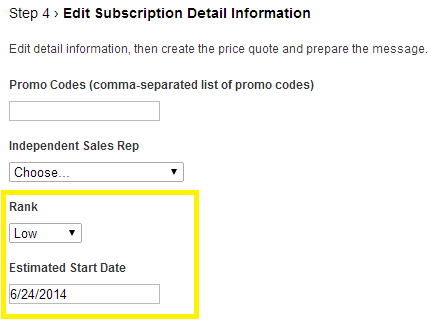
In Step 4 of the Price Quote and Renewal Quote Wizards you will be able to select the rank and also an Estimated Start Date.
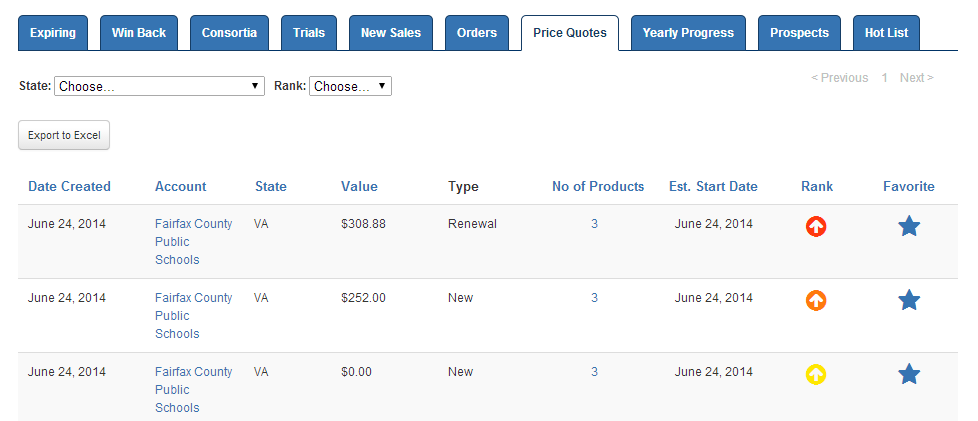
Now, from the Price Quotes tab on your Sales Dashboard you will be able to see all active (created in the last 30 days) Quotes with the new fields added.
Some Additional Features
- Click any “No of Products” to see the full details on a Quote.
- Click any “Rank” to change from a low, medium, or high setting.
- Export to Excel Option has been added.
- Filter by State or Rank.
- Sort by “Est. Start Date” by clicking on the column name.
Coming soon will be the added function of updating any existing quote to be resubmitted.