
On both the Subscription and Account Report Wizards, a new display field has been added - "Record URL".
This display field allows you to add a specified Product link in your Excel Exported Report that can include any school's unique Account ID. The Account ID enables any authentication settings provided by the customer to work, as long the link you inputted fits the product's standard URL format.
You can find the standard Record URL at the bottom of any article / video page when logged into an Infobase online product.
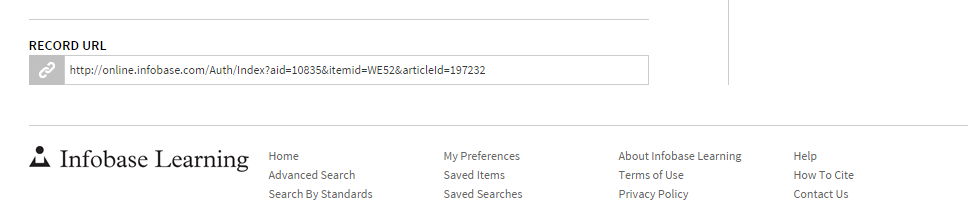
For more on Record URLs, please go here.
Once you have located the Record URL you would like to include in your report, click the Record URL checkbox and paste the link in the text box that appears.
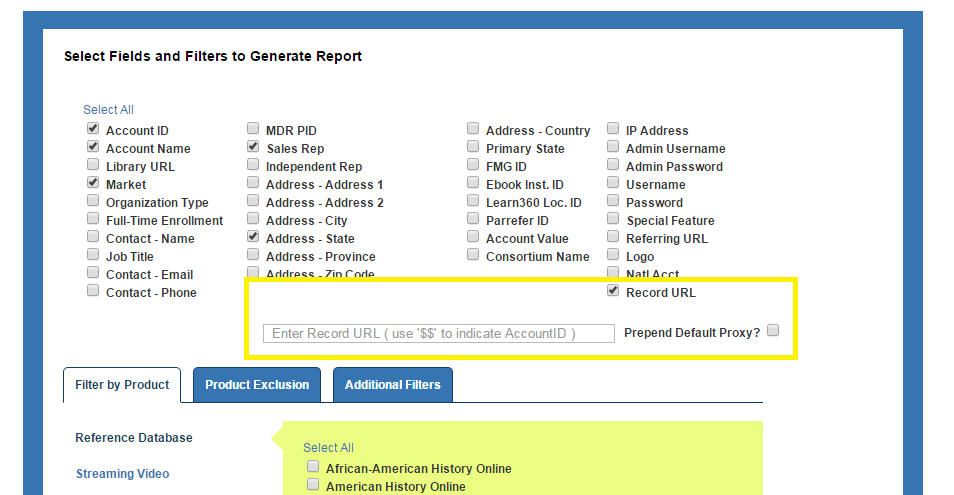
To ensure that the report customizes the Record URL to each specific account, replace the Account ID in the URL with "$$" (quotations not included).
For example:
Record URL - http://online.infobase.com/Auth/Index?aid=10835&itemid=WE52&articleId=197232
Reformatted for Report - http://online.infobase.com/Auth/Index?aid=$$&itemid=WE52&articleId=197232
You can also add an Account Proxy URL Modifier to the Record URL as well. This ensures any additional authentication info we have on file is applied to the link.